Introduction
When creating custom packaging, one small mistake in design can lead to a completely unusable box. That’s where a dieline comes in.
A dieline is the blueprint of your packaging. It shows exactly where the box will be cut, folded, and assembled before it is printed and produced. Without it, even the most beautiful design can fail during manufacturing.
Whether you are a business owner ordering custom boxes or a designer working on packaging, understanding dielines is essential. It helps you avoid costly errors, ensures accurate printing, and guarantees that your final product looks exactly as expected.
In this guide, you will learn what a dieline is, how it works, why it matters, and how you can use it to create perfect packaging every time.
What is a Dieline? (Simple Guide for Packaging Beginners)
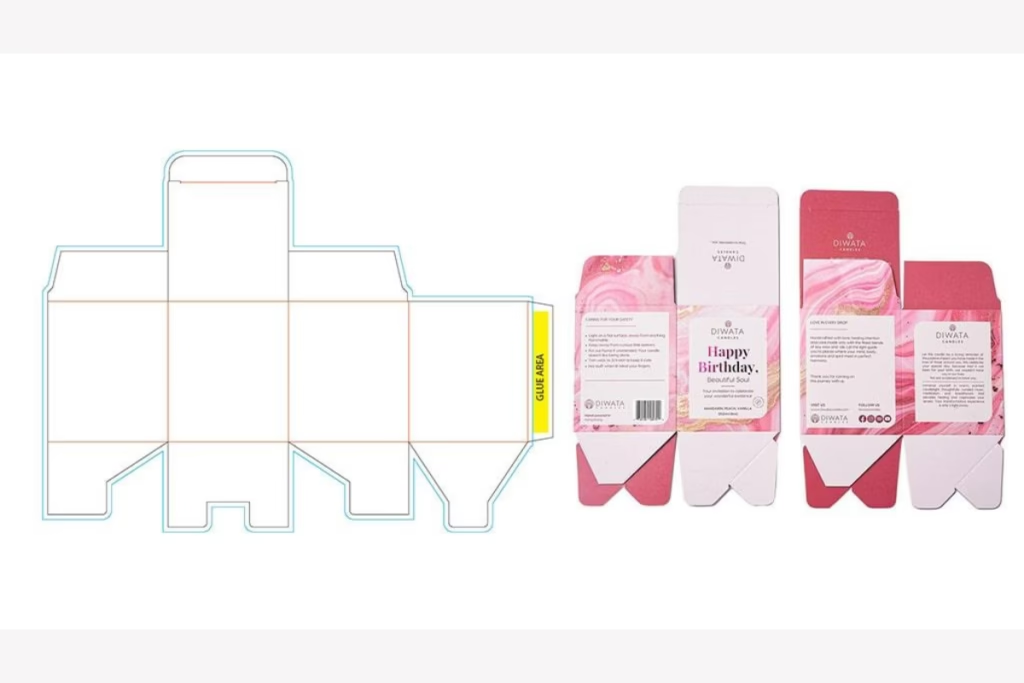
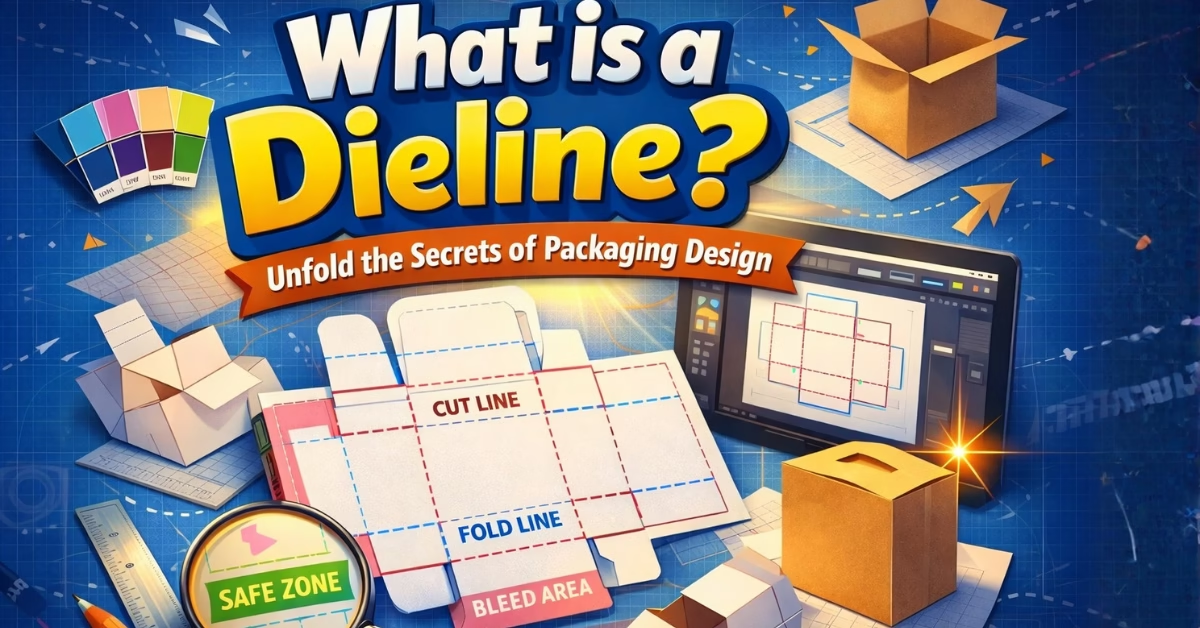
A dieline is a flat template that shows exactly how a package will be cut, folded, and assembled. It works like a blueprint for your box before it is printed.
Think of it like a cereal box before it is folded. When you open and flatten a box, you see all the panels, flaps, and edges laid out in one piece. That flat layout is what we call a dieline.
It tells printers and manufacturers where to cut the material, where to fold it, and where to place glue so the box comes together perfectly.
👉 Simple takeaway:
A dieline is the guide that turns a flat design into a real, working package.
Why This “Dieline” Matters More Than You Think
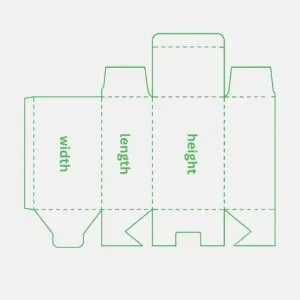
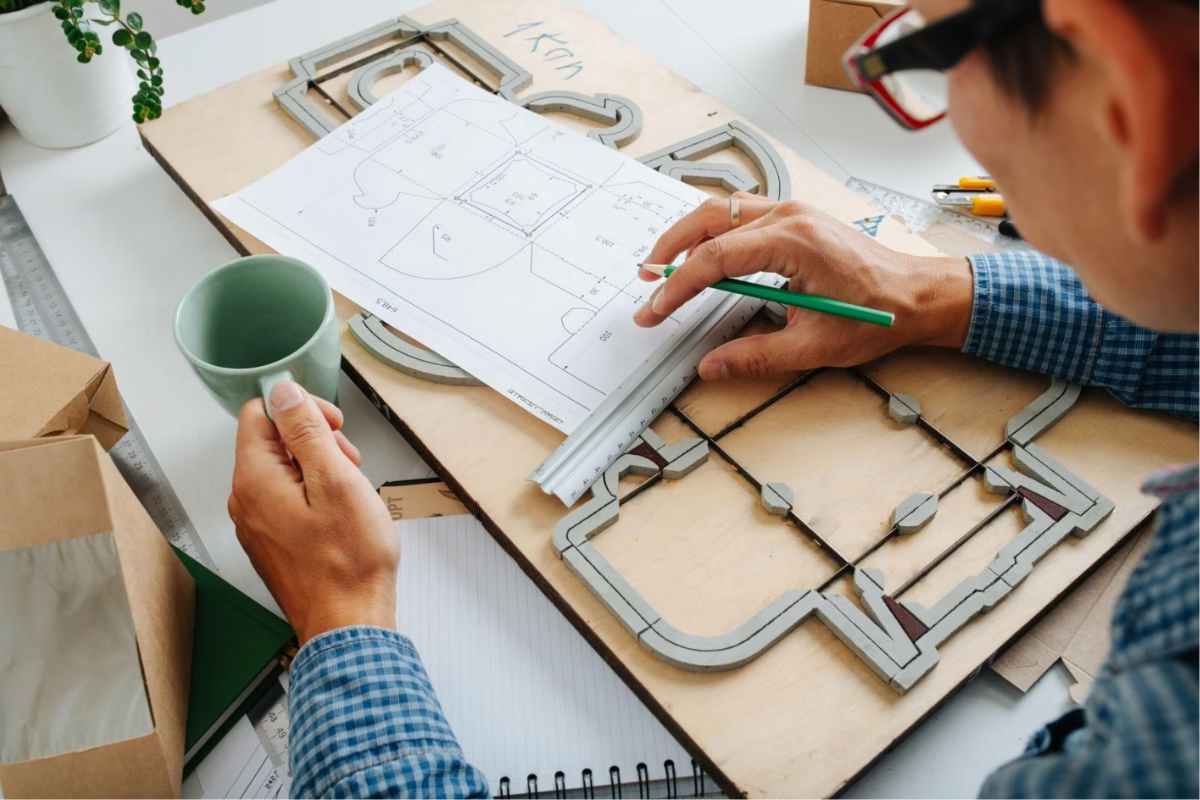
A dieline is not just a technical drawing. It is what makes sure your packaging actually works in real life.
Without a proper dieline, small mistakes can turn into big problems. Your design might get cut off, panels may not align, or the box might not fold correctly. This can lead to wasted materials, extra costs, and delays in production.
With a correct dieline, everything is planned before printing starts. It ensures that every cut, fold, and panel fits exactly where it should. This means your final box looks clean, professional, and exactly how you designed it.
👉 Simple takeaway:
A dieline helps you avoid costly mistakes and makes sure your packaging turns out right the first time.
What’s Inside a Dieline? (Key Elements Explained)
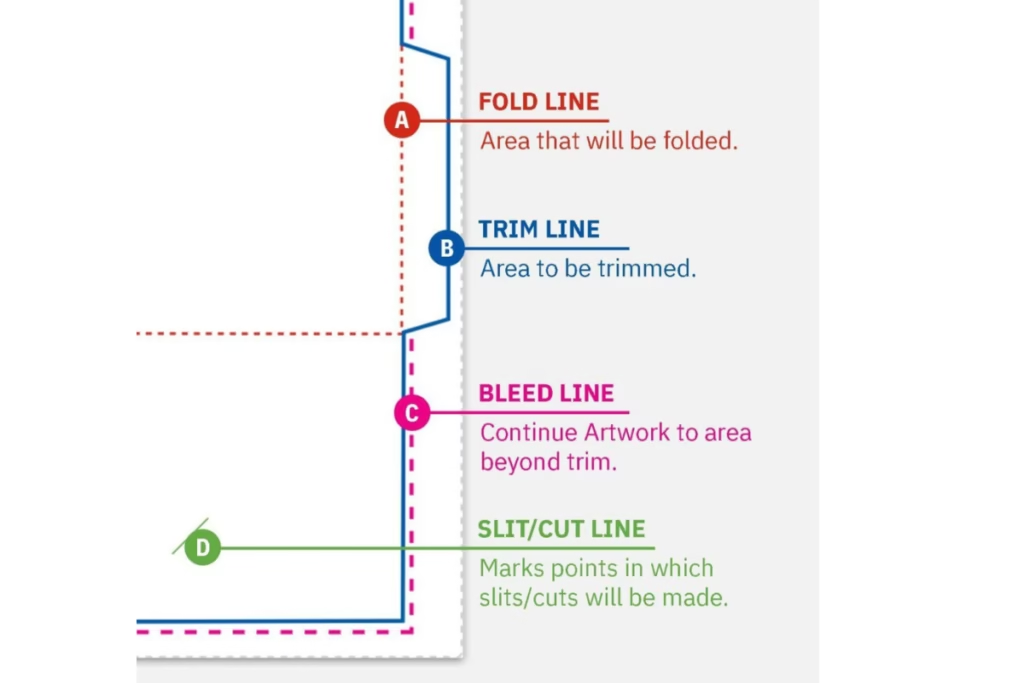
Now that you know why a dieline matters, let’s look at what it actually includes. Each part has a specific job to make sure your packaging works perfectly.
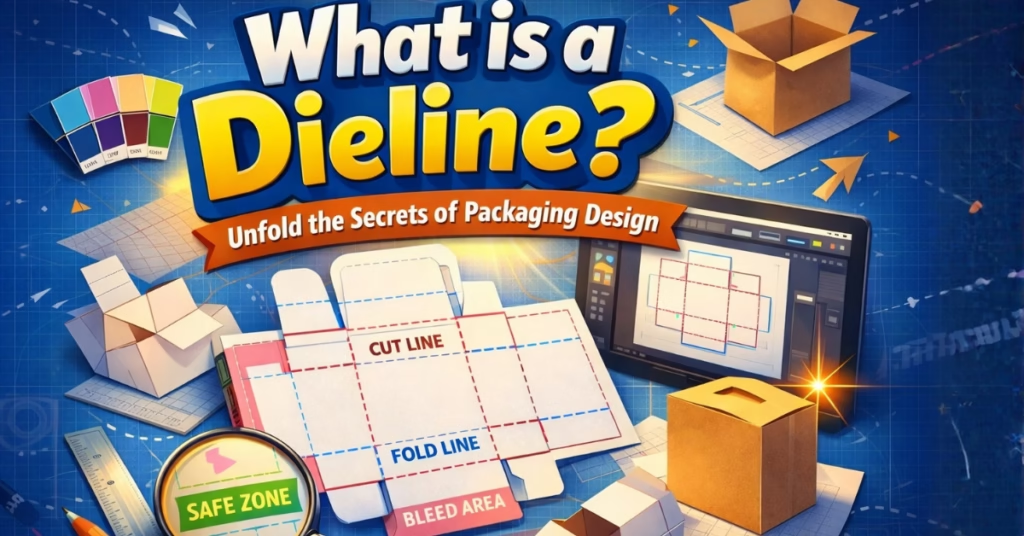
✂️ Cut Lines
These lines show where the material will be cut. After printing, machines follow these lines to shape the box.
📐 Fold Lines (Score Lines)
These lines show where the box will be folded. They help the packaging bend easily without damaging the design.
🩸 Bleed Area
This is the extra space around your design. It makes sure no white edges appear after cutting.
🛡️ Safety Margin (Safe Zone)
This area keeps your important text and logos safe. Anything placed here will not get cut off.
🔩 Glue Tabs
These are small sections where glue is applied to hold the box together.
👉 Simple takeaway:
Each line in a dieline has a purpose. Together, they guide how your packaging is cut, folded, and assembled.
How a Dieline Works (From Design to Final Box)
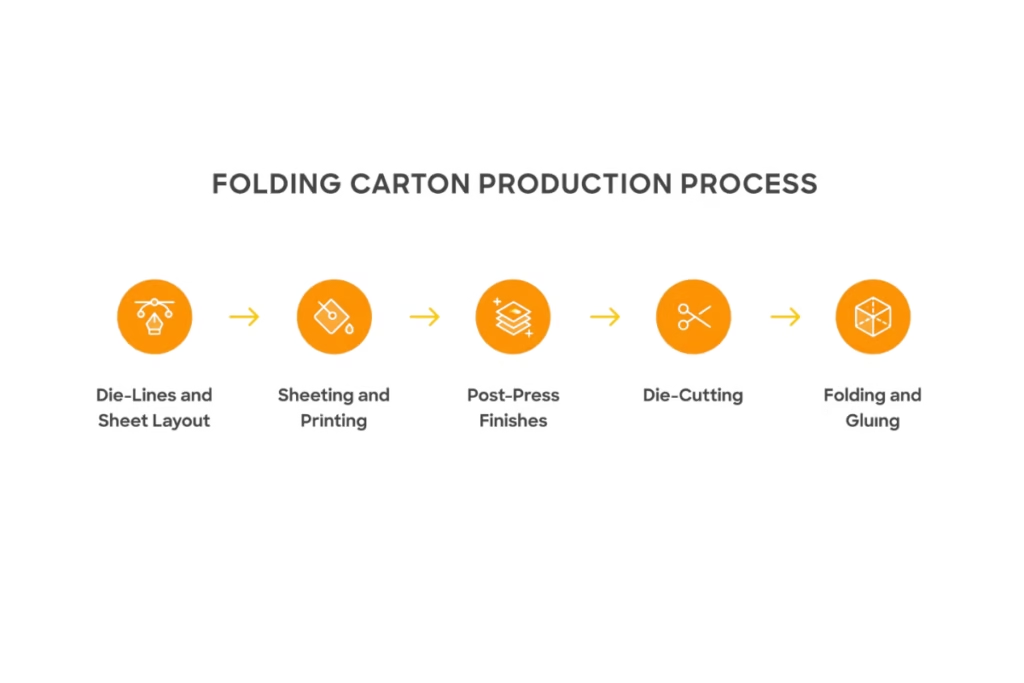
Now that you know the parts, let’s see how everything comes together in a simple flow. This will help you clearly understand how a flat design turns into a real box.
1. Box Structure is Created
First, the size and shape of the box are decided. This depends on your product and how you want it to be packed.
2. Dieline Template is Prepared
A flat layout is created showing all panels, flaps, and folds. This becomes the base for your design.
3. Design is Placed on the Layout
Your artwork, colors, and text are added to the dieline in the correct positions.
4. Printing Begins
The final design is printed onto the packaging material.
5. Die-Cutting Process
Machines follow the dieline to cut and crease the material exactly as planned.
6. Folding and Assembly
The cut pieces are folded along the lines and glued where needed to form the final box.
👉 Simple takeaway:
A dieline guides the entire journey from a flat design to a finished, usable package.
How to Read a Dieline (Without Confusion)
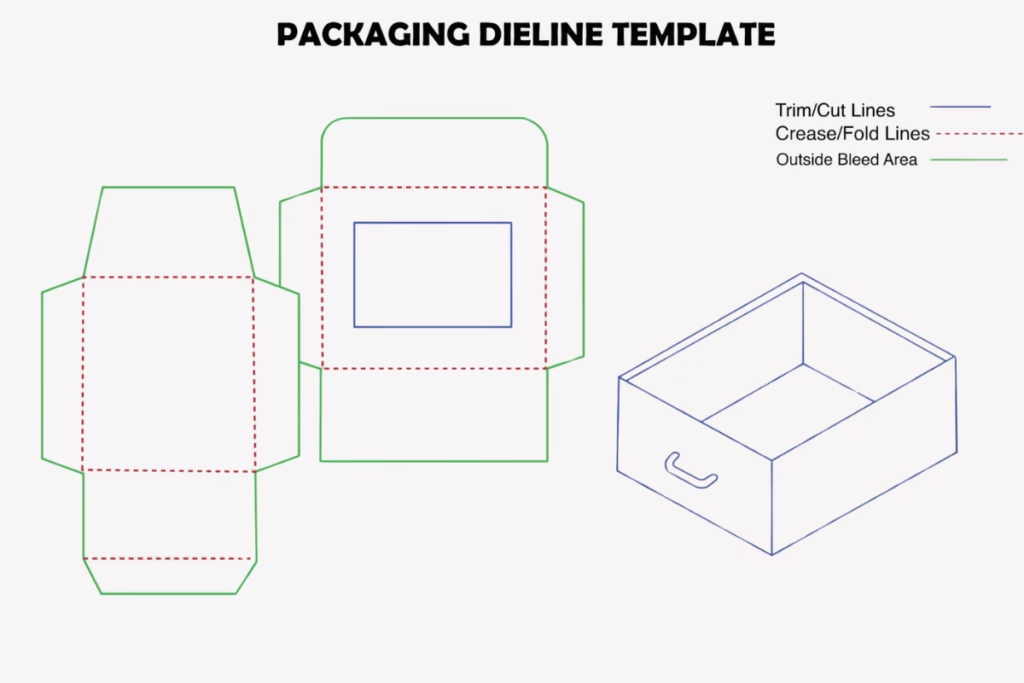
At first, a dieline can look a bit strange. It is flat, full of lines, and may feel confusing if you have never seen one before. But once you understand the basics, it becomes very easy to read.
Why It Looks Flat and Weird
A dieline is not meant to look like a finished box. It is a flat layout. That is why it shows all sides of the box in one place.
Understanding Line Types
Different lines mean different actions.
- Solid lines usually show where the cut will happen
- Dotted or dashed lines show where the box will fold
- Other markings show glue areas or safety zones
Why Some Parts Look Upside Down
This is normal. Different panels are placed in different directions so they fold correctly when the box is assembled.
Simple Trick to Understand It
Imagine folding the layout in your mind like a paper box. Once you do that, the design starts to make sense.
👉 Simple takeaway:
A dieline looks confusing at first, but it becomes easy when you imagine it as a folded box instead of a flat sheet.
Types of Dielines You’ll See
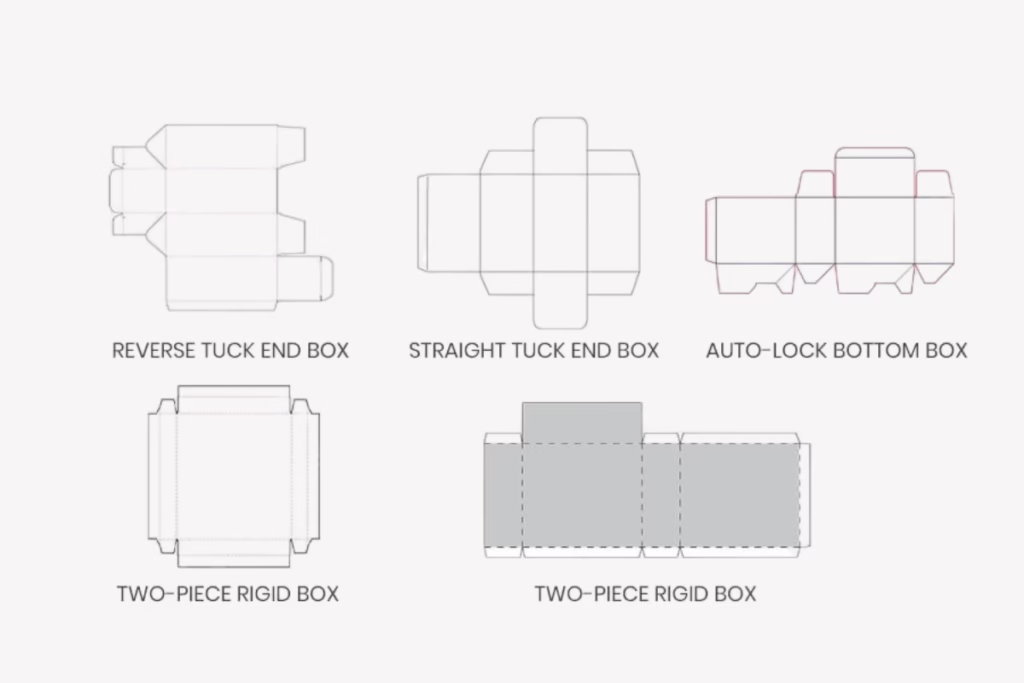
Not all dielines look the same. They change depending on the type of packaging you are making. But the basic idea stays the same in every case.
📦 Box Dielines (Most Common)
These are used for product boxes like cosmetics, electronics, food, and retail packaging. They include panels, flaps, and glue tabs.
🏷️ Label Dielines
These are used for stickers and product labels. They are usually simple shapes like circles, squares, or custom outlines.
🔷 Custom Shape Dielines
These are unique packaging designs made in special shapes. They are used when brands want something creative and different.
👉 Simple takeaway:
Different products need different dielines, but all of them follow the same basic structure of cut, fold, and design.
A Real Example: From Flat Dieline to Finished Box
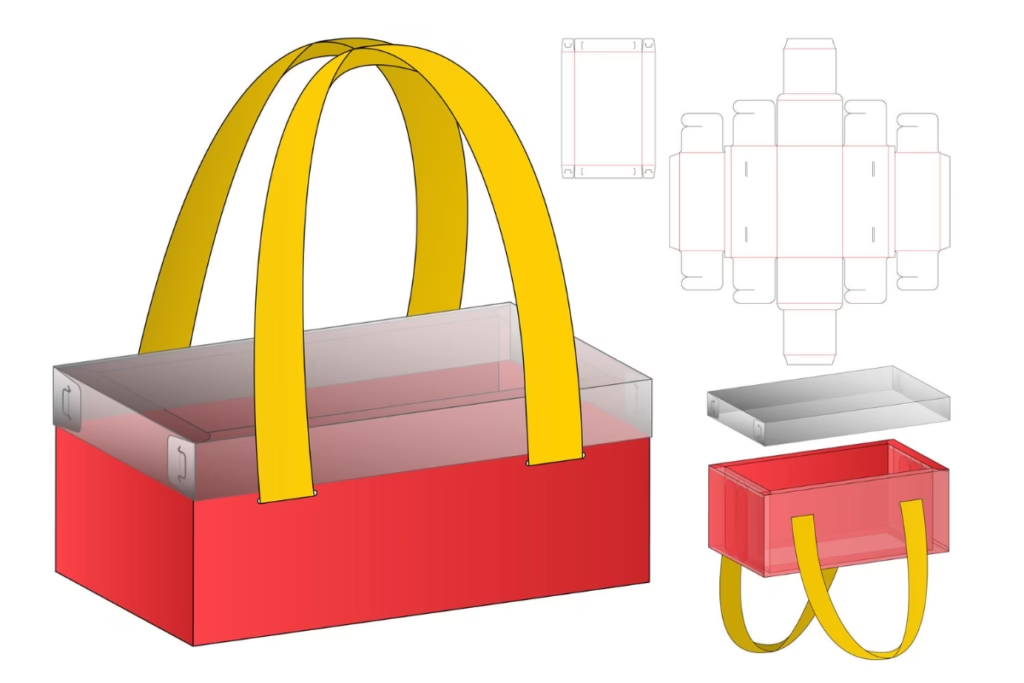
Now let’s connect everything you’ve learned with a simple real-life example. This is where a dieline finally starts to make complete sense.
Imagine a Simple Product Box
Think about a small skincare cream box or a phone accessory box.
At first, it is just a flat printed sheet. This sheet has all the sides of the box laid out in one place.
Flat Layout Stage
You will see:
- Front panel
- Back panel
- Side panels
- Top and bottom flaps
- Fold and cut lines
Everything is arranged flat, but each part has a clear purpose.
After Cutting and Folding
Once the dieline is followed:
- The machine cuts the shape
- The fold lines help bend the box correctly
- Glue tabs hold everything together
Finally, the flat sheet turns into a proper 3D box you can hold.
Who Creates a Dieline, and Do You Need to?
This is one of the most important questions people have when they first hear about dielines. The good news is, in most cases, you don’t need to create one yourself.
👨💻 Packaging Designers and Manufacturers
Most dielines are created by professional packaging designers or printing companies. They already know the correct measurements, folds, and printing rules.
📦 When Suppliers Provide It
If you are ordering custom packaging, your supplier usually gives you a ready-made dieline template. You just place your design on it.
🤝 Do You Need to Make One Yourself?
In most cases, no. If you are a business owner, your manufacturer handles it for you. You only need to share your product size and requirements.
However, if you are working as a designer or creating fully custom packaging from scratch, then you may need to work with a dieline.
👉 Simple takeaway:
Most of the time, dielines are created by professionals, not business owners. You just use them to place your design correctly.
How to Create a Dieline (If You Need One)
If you ever need to create a dieline yourself, don’t worry. It is not magic or something extremely complex. It just needs accuracy and basic design knowledge.
📏 Start with Size and Product
First, you need the exact size of your product. The box must fit it properly, so measurements are very important.
💻 Use the Right Software
Most professionals use tools like Adobe Illustrator. These tools help you create accurate lines and layouts.
✂️ Add Correct Printing Rules
You must include:
- Bleed area so nothing gets cut off
- Safe zone so text stays visible
- Proper fold and cut lines
🧪 Test Before Final Printing
Before sending it to production, it is always smart to print a simple paper version. This helps you check folding and sizing.
👉 Simple takeaway:
Creating a dieline is about correct measurement, proper layout, and careful testing before final printing.
Tools Used for Dieline Design
To create a proper dieline, designers use specific software and tools. These help make sure everything is accurate, clean, and ready for printing.
💻 Adobe Illustrator
This is the most commonly used tool. It helps designers create precise vector lines, which are very important for printing and cutting.
📦 ArtiosCAD
This is an industry-level tool used in packaging companies. It is mainly used for complex box structures and technical packaging designs.
🧊 Esko Studio / 3D Tools
These tools allow you to see a 3D preview of your packaging before it is printed. This helps you understand how the final box will look.
📁 Ready-Made Templates
Many packaging suppliers also provide dieline templates. You just place your design on them instead of building everything from scratch.
👉 Simple takeaway:
Professionals use special tools to create accurate and print-ready dielines, but beginners can also start with ready-made templates.
Common Mistakes to Avoid
Even a small mistake in a dieline can ruin the final packaging. That’s why it’s important to know what to avoid before sending your design for printing.
❌ Ignoring the Bleed Area
If you don’t add bleed, parts of your design may get cut off during printing. This is one of the most common and expensive mistakes.
❌ Placing Text Too Close to Edges
Important text or logos should never be near the edge. It can get cut or look misaligned after folding.
❌ Using the Wrong Color Mode
Designing in RGB instead of CMYK can change colors in printing. Always use CMYK for packaging.
❌ Wrong Measurements
Even a small size mistake can make the box too tight or too loose for the product.
❌ Not Testing the Design
Skipping a paper mockup can lead to surprises after production. A simple fold test can save big problems.
👉 Simple takeaway:
Most dieline problems happen because of small carelessness. Checking details before printing saves time, money, and stress.
Pro Tips for Better Packaging Results
Now that you know the basics and common mistakes, here are some simple but powerful tips that can make your packaging much more professional and error-free.
📦 Always Start with a Supplier Template
If your packaging supplier provides a dieline template, always use it. It is already tested for correct size and printing.
📏 Double-Check Everything Before Printing
Before final approval, check:
- Size accuracy
- Text alignment
- Bleed and safe zones
Small checks can prevent big losses.
🧪 Always Print a Sample First
Even if everything looks perfect on screen, print a paper sample and fold it. This helps you see the real result.
🧩 Keep Your Design Clean and Organized
Use separate layers for dieline and artwork. This makes editing easier and avoids mistakes during printing.
🤝 Communicate Clearly with Your Manufacturer
Always confirm details like size, material, and printing method before production starts. Clear communication avoids confusion.
👉 Simple takeaway:
Good packaging is not luck. It comes from careful checking, proper planning, and clear communication.
Final Thoughts: Start Your Packaging the Right Way
A dieline may look complicated at first, but once you understand it, it becomes one of the most important parts of packaging design.
It is the foundation that turns a simple idea into a real, physical box. Every cut, fold, and panel depends on it. Without a correct dieline, even the best design can fail during printing or production.
The good thing is, you don’t need to worry too much about creating it from scratch. In most cases, your packaging supplier handles the dieline for you. If you are looking for professional packaging with properly designed dielines, you can work with experienced packaging teams who manage everything from structure to final print-ready files.
Once you see a dieline a few times, it stops feeling technical and starts making sense as a simple layout of your future box.
👉 Simple takeaway:
A dieline is not just a design file. It is the starting point of every successful packaging project.